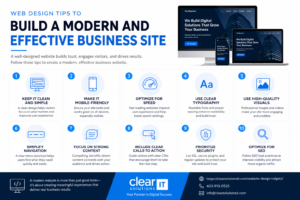

Your website is often the first interaction a potential customer has with your business. Whether you run a startup in Calgary’s Beltline, a retail shop in Airdrie, or a service company in Okotoks, the quality of your web design directly shapes whether visitors stay, trust you, and convert.
A modern, effective business site loads fast, works flawlessly on phones, clearly communicates what you do, and guides visitors toward taking action. Below are practical web design tips you can apply right away — whether you’re planning a new build or evaluating your current site.
Start With a Mobile-First, Responsive Layout
More than half of all web traffic now comes from mobile devices, according to Statista’s global mobile traffic reports. If your site doesn’t adapt to smaller screens, you’re losing customers before they even see your offer.
Responsive web design ensures your layout, images, and navigation adjust automatically to any screen size — phone, tablet, or desktop. This isn’t optional anymore. Google uses mobile-first indexing, meaning it primarily evaluates the mobile version of your site when determining rankings.
Practical steps:
- Use flexible grid layouts rather than fixed-width containers.
- Ensure buttons and links are large enough to tap comfortably (at least 44×44 pixels, per Apple’s Human Interface Guidelines).
- Test your site on real devices, not just browser simulators.
- Collapse navigation into a clean hamburger menu on mobile, but keep key pages accessible.
If you’re building from scratch or redesigning, responsive web design should be the foundation — not a feature added later.
Prioritize Page Speed and Core Web Vitals
A slow website kills conversions. Google’s Core Web Vitals — Largest Contentful Paint (LCP), Interaction to Next Paint (INP), and Cumulative Layout Shift (CLS) — are real ranking factors that also reflect genuine user experience.
You don’t need to memorize the acronyms. Focus on what they mean in practice:
- LCP: Your main content should load within 2.5 seconds.
- INP: The page should respond to clicks and taps almost instantly.
- CLS: Elements shouldn’t jump around as the page loads.
How to improve speed:
- Compress images using modern formats like WebP or AVIF.
- Minimize unnecessary JavaScript and CSS.
- Use a reliable hosting provider with servers close to your audience (a Canadian host helps for Calgary-area businesses).
- Implement lazy loading for images below the fold.
- Enable browser caching.
Run your site through Google PageSpeed Insights to get a baseline. Scores below 50 on mobile typically signal real problems that affect both rankings and user satisfaction.
Design for Your Local Calgary Audience
Generic website design rarely connects with local customers. If you serve Calgary, Chestermere, Cochrane, Strathmore, or the broader Rocky View County area, your site should reflect that.
This goes beyond slapping “Calgary” into your headline. Think about:
- Local imagery: Use real photos of your team, your storefront, or recognizable Calgary-area locations instead of generic stock photos.
- Service area clarity: List the specific communities you serve. A customer in Crossfield or Langdon wants to know you’ll actually come to them.
- Local contact details: Display a local phone number and physical address (if applicable). This builds trust and supports local search visibility.
- Community relevance: Reference local events, seasons, or industry specifics that matter to your audience. A Calgary HVAC company, for example, should speak to chinooks and -30°C winters.
When your website design reflects the community you serve, visitors feel an immediate connection. That trust shortens the path from browsing to buying.
For businesses looking to strengthen their local online presence further, pairing good design with a solid local SEO strategy creates a compounding effect.
Simplify Navigation and User Experience
Complex navigation is one of the fastest ways to lose visitors. Most users decide within seconds whether your site is worth exploring. If they can’t find what they need, they leave.
Keep your navigation lean:
- Limit your main menu to 5–7 items. Group related pages under dropdowns if necessary.
- Use clear, descriptive labels. “Our Services” is better than “Solutions Ecosystem.”
- Include a prominent search bar if you have a large site or e-commerce catalogue.
- Add breadcrumb trails on inner pages so users always know where they are.
Reduce friction on key pages:
- Your homepage should answer three questions within the first scroll: What do you do? Who is it for? What should I do next?
- Service pages need specific details, not vague promises. List deliverables, timelines, and pricing if possible.
- Contact forms should ask for the minimum information you actually need. Every extra field reduces submissions.
Good user experience (UX) isn’t about flashy animations. It’s about removing obstacles between your visitor and their goal.
Build Trust With Clear Calls to Action
Every page on your site should have a purpose, and that purpose should be obvious to the visitor. A well-placed call to action (CTA) tells people exactly what to do next.
CTA best practices:
- Use action-oriented language: “Get a Free Quote,” “Book a Consultation,” “Shop Now” — not “Click Here” or “Submit.”
- Make primary CTAs visually distinct with contrasting colours.
- Place CTAs above the fold and again at the bottom of longer pages.
- Limit competing CTAs. If you ask visitors to call, email, fill out a form, and follow you on Instagram all in the same section, they’ll likely do none of them.
For e-commerce businesses in Calgary or surrounding areas, your product pages should feature clear “Add to Cart” buttons, transparent shipping information, and visible trust signals like secure checkout badges and return policies.
Make Accessibility a Standard, Not an Afterthought
Accessible web design isn’t just the right thing to do — it’s increasingly a legal and business requirement. In Canada, the Accessible Canada Act (ACA) sets expectations for a barrier-free digital experience, and businesses of all sizes are feeling the pressure to comply.
Quick accessibility wins:
- Ensure sufficient colour contrast between text and backgrounds (WCAG 2.1 recommends a minimum 4.5:1 ratio for normal text).
- Add descriptive alt text to all meaningful images.
- Make sure every interactive element is fully operable via keyboard.
- Use proper heading hierarchy (H1 → H2 → H3) rather than styling text for visual effect.
- Provide captions or transcripts for video content.
Accessible sites also tend to perform better in search because many accessibility practices overlap with good web development fundamentals — clean code, semantic HTML, and logical structure.
When to Bring in Professional Web Design Services
DIY website builders work for very simple needs, but most growing businesses outgrow them quickly. Template-based sites often struggle with speed, customization, scalability, and genuine search visibility.
Consider professional web design services when:
- Your current site takes more than 3 seconds to load on mobile.
- You’re getting traffic but very few inquiries or sales.
- Your site doesn’t reflect the quality of your actual products or services.
- You need e-commerce functionality, booking systems, or custom integrations.
- You’re expanding into new markets across the Calgary region and need a site that scales.
A professional team handles the technical heavy lifting — responsive layouts, performance optimization, security, and SEO-friendly architecture — so you can focus on running your business. The right partner will also align your site with your broader digital marketing goals, ensuring your website works as a genuine revenue tool rather than a static brochure.
Frequently Asked Questions
How much does professional web design cost for a small Calgary business?
Costs vary widely based on scope, functionality, and customization. A basic informational site will cost less than a full e-commerce build. The best approach is to request a detailed quote based on your specific needs rather than comparing generic price lists.
How long does it take to design and launch a business website?
A straightforward site typically takes 4–8 weeks from kickoff to launch. More complex projects with custom functionality, e-commerce, or extensive content may take 8–16 weeks. Timelines depend on how quickly feedback and content are provided.
Do I need a separate mobile site, or is responsive design enough?
Responsive design is the current standard and is what Google recommends. A single responsive site is easier to maintain, better for SEO, and provides a consistent experience across all devices. Separate mobile sites (m-dot sites) are largely outdated.
Final Thoughts
Effective web design combines technical performance, clear communication, and genuine respect for your visitors’ time. Start with a responsive foundation, optimize for speed, design for your local audience, and make every page purposeful.
If your current site isn’t generating the results you need — or if you’re launching a new venture in Calgary, Airdrie, Okotoks, or anywhere in the surrounding region — Clear Solutions IT can help you build a site that looks great, performs well, and actually grows your business.