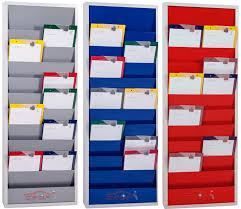

Efficient workshop and warehouse operations depend on more than skilled employees and reliable equipment. Teams also need a clear way to see what work is scheduled, what assets are being serviced, and which tasks require attention. When information is scattered across paperwork, spreadsheets, emails, or verbal instructions, even straightforward jobs can become difficult to coordinate. Planning Boards provide a practical visual management solution that helps teams organise operational information in one accessible location.
For workshops, warehouses, fleet facilities, and maintenance environments, visual planning can make daily activities easier to understand. Instead of searching through multiple systems to determine what is happening, employees can quickly review a structured board and identify relevant jobs, service requirements, or workflow stages.
What Are Planning Boards?
Planning Boards are visual management systems designed to display operational information in a clear and organised format. Depending on the application, a board may be used to schedule maintenance, track vehicles, organise service activities, allocate work, or monitor equipment.
A typical planning system can use service cards, rails, headings, labels, or other visual identifiers. This makes important information easier to locate while reducing reliance on individual memory or informal communication.
In busy environments, the main advantage is visibility. Everyone who works with the system can understand the current status of relevant tasks without needing to ask several people for updates.
Why Visual Planning Matters in Busy Workplaces
Workshop and warehouse environments often involve multiple activities happening simultaneously. Vehicles may arrive for servicing while technicians are completing existing jobs, spare parts are being prepared, and supervisors are allocating upcoming work.
A visual planning system creates a shared reference point.
Key advantages include:
- Greater visibility: Teams can see scheduled activities and current workloads at a glance.
- Improved organisation: Jobs can be arranged according to priority, date, department, or service requirement.
- Faster communication: Employees can obtain basic operational information without relying entirely on verbal updates.
- Better workflow control: Supervisors can identify pending, current, and upcoming tasks more easily.
- Reduced administrative clutter: Physical planning can complement digital systems and reduce dependence on scattered notes.
These benefits are particularly valuable where employees need to make quick decisions throughout the working day.
How Planning Boards Support Workshop Management
Workshop management requires coordination between people, vehicles, equipment, parts, and deadlines. A workshop planning board can provide a simple visual overview of these moving parts.
For example, a service manager may use individual service boards to identify vehicles awaiting inspection, vehicles currently being repaired, and jobs that are ready for collection.
This approach can help answer common operational questions quickly:
Which vehicles are scheduled today?
Which jobs are currently in progress?
What work is waiting for attention?
Which service tasks need to be completed next?
When information is presented consistently, supervisors and technicians can spend less time searching for updates and more time concentrating on their assigned work.
Planning Boards for Fleet and Vehicle Maintenance
Fleet operators often manage numerous vehicles with different service schedules and maintenance requirements. Missing a maintenance deadline can affect vehicle availability, operational efficiency, and potentially safety.
A visual planning system can help maintenance teams organise service activities around established schedules.
A board can be structured to show information such as:
- Vehicle identification
- Scheduled service dates
- Maintenance status
- Assigned technician
- Required service work
- Completion status
- Upcoming maintenance
The exact information displayed will depend on the organization’s workflow. The important principle is to create a consistent visual process that employees can understand quickly.
Supporting Warehouse and Asset Management
Visual planning is not limited to vehicle workshops. Warehouses and industrial facilities also need effective ways to coordinate equipment, service activities, inspections, and operational tasks.
A structured board can help teams identify where work stands and what needs to happen next. When combined with appropriate asset management procedures, visual planning can contribute to a more organised workplace.
For businesses handling valuable equipment or access-controlled assets, planning can also complement broader key and asset management processes.
Choosing the Right Planning System
Not every workplace has the same operational requirements. Before selecting a planning board, businesses should consider how information is currently managed and what employees need to see during daily operations.
Consider the Available Space
The board should be large enough to display essential information without making the system difficult to understand. Available wall space and the number of users should influence the configuration.
Consider the Number of Jobs
A small workshop may require a straightforward system, while a large facility may need multiple rows or sections to accommodate a greater volume of work.
Consider the Information Displayed
Determine whether the board will display vehicle information, service activities, employee assignments, maintenance schedules, or other operational details.
Consider Durability
Workshop and warehouse environments can be demanding. A planning system should be suitable for the working conditions in which it will be installed and used.
What Makes a Good Planning Board?
A useful planning system should be easy to understand and simple to maintain. Complexity can reduce adoption, particularly when employees need to update information frequently.
Good visual planning generally involves:
- Clear categories
- Consistent labels
- Easy-to-read information
- Logical positioning
- Simple updating procedures
- Appropriate capacity for the workplace
The goal is not to display every possible piece of information. Instead, the board should present the information employees actually need to make operational decisions.
Combining Physical and Digital Management
Modern businesses frequently use software for scheduling, inventory, asset management, and reporting. That does not necessarily make physical visual planning obsolete.
Digital systems are useful for storing detailed records and generating reports, while physical boards can provide an immediate visual overview within the workplace.
For example, a manager may maintain detailed service records digitally while using a physical planning system to show the current workload to technicians on the workshop floor.
This combination can provide both detailed recordkeeping and practical day-to-day visibility.
Planning Boards from eKeymanager
Businesses looking for practical workshop and warehouse planning solutions can explore the Planning Boards available from eKeymanager. The range includes workshop and warehouse planners designed for operational environments, with systems incorporating service boards, rails, and different planning configurations.
eKeymanager focuses on key management and related workplace organisation solutions, supporting industries where effective control of keys, assets, vehicles, and operational processes is important. Its planning solutions can form part of a broader approach to keeping workshop and warehouse activities organised.
Frequently Asked Questions
What are Planning Boards used for?
Planning Boards are used to visually organise and communicate operational information. Common applications include workshop scheduling, vehicle servicing, maintenance coordination, warehouse activities, and job allocation.
Are Planning Boards suitable for fleet management?
Yes. Fleet maintenance teams can use visual planning to organise vehicle servicing, inspections, repairs, and upcoming maintenance activities.
Can a planning board replace workshop software?
Not necessarily. Physical planning and software serve different purposes. A board can provide immediate visual information, while software can store detailed records, reporting data, and historical information.
What information can be displayed?
The information depends on the workplace. Common examples include vehicle numbers, service requirements, job status, scheduled dates, technician assignments, and maintenance activities.
How can businesses improve planning efficiency?
Start by identifying the information employees need most frequently. Create clear categories, establish consistent updating procedures, and position the board where relevant employees can easily see and maintain it.
Conclusion
Effective workplace organisation starts with making important information visible and accessible. In workshops, warehouses, fleet facilities, and maintenance environments, Planning Boards can provide a straightforward way to coordinate jobs, monitor workloads, and improve communication between team members.
Rather than relying exclusively on verbal instructions, scattered paperwork, or constantly checking different systems, teams can use a central visual reference point to understand what is happening and what needs attention.
When selected according to the workplace’s size, workflow, and operational requirements, a planning system can become a valuable part of everyday management. Combined with digital tools and effective processes, visual planning can help businesses create a more organised, efficient, and accountable working environment.