
WhatsApp has become one of the easiest ways to stay connected with friends, family, classmates, and communities. While a normal message gets the job done, adding a little style can make your conversations more expressive and interesting. Stylish text can be useful for greetings, quotes, announcements, special occasions, and WhatsApp Status updates.
The good news is that creating attractive WhatsApp messages does not require graphic design skills. With built-in formatting features, Unicode characters, and online text generators, you can quickly turn ordinary words into something more creative.
Why Create Stylish WhatsApp Messages?
A well-formatted message can make important information easier to notice. It can also help you express a mood or personality more clearly.
For example, bold text can highlight an important detail, while cursive or decorative lettering can give a greeting a more elegant appearance. Stylish text is particularly useful when you want a short message to feel more memorable.
However, the goal should always be readability. A message can look creative without being overloaded with symbols or unusual characters.
1. Use Bold Text for Important Words
Bold formatting is one of the simplest ways to make a WhatsApp message stand out. It works well for names, dates, reminders, announcements, and key points.
Instead of making an entire paragraph bold, highlight only the most important words. This creates visual contrast and helps the reader find the main information quickly.
For example, if you are sending an event reminder, you might emphasize the date or location rather than formatting the entire message.
2. Try Cursive Text
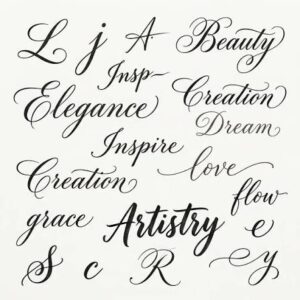
Cursive text gives messages a flowing, handwritten-inspired appearance. It is especially suitable for quotes, greetings, personal messages, and aesthetic Status updates.
You can use cursivefont.io to transform ordinary text into different cursive styles. Once you find a style you like, copy the generated text and paste it into WhatsApp.
This is a simple way to add a decorative touch without creating an image or using complicated editing software.
3. Experiment With Italic Text
Italic text is another useful formatting choice. It can emphasize a particular phrase without making it as prominent as bold text.
Use italics for short thoughts, quotes, or individual words that you want to distinguish from the rest of your message. Combining normal and italic text can create a clean and professional appearance.
4. Add Decorative Unicode Characters
Unicode characters can provide additional creative options. Stars, hearts, arrows, flowers, and other symbols can be placed around a short phrase or used to separate sections of a message.
For example, a simple greeting can be surrounded by a few decorative symbols to make it more visually appealing.
Avoid using too many symbols, though. Excessive decoration can make a message harder to read, especially on a small phone screen.
5. Create Stylish WhatsApp Status Updates
WhatsApp Status is one of the best places to experiment with creative text. You can share a short quote, daily thought, announcement, or greeting using different lettering styles.
Try matching the text to your background. A simple cursive phrase may look great over a calm photo, while bold text could work better on a busy or colorful background.
6. Match the Style to the Occasion
Think about the purpose of your message before choosing a text style. A birthday greeting may look good with decorative lettering and celebration symbols, while an important reminder is usually better with simple bold formatting.
For friendly conversations, you can experiment more freely. For group announcements or useful information, keep the design simple and easy to scan.
7. Keep Your Message Readable
Stylish text should improve communication rather than create confusion. Some Unicode characters may display differently depending on the device or operating system.
Always check your message before sending it. If the letters look unusual or difficult to recognize, choose a simpler style.
It is also a good idea to avoid converting long paragraphs into decorative lettering. Stylish text is usually most effective when used for short phrases.
8. Create Your Own Consistent Style
If you frequently post WhatsApp Status updates, you can develop a recognizable text style. For example, you might use cursive lettering for quotes and standard text for everyday updates.
Experiment with different options until you find combinations that feel natural. cursivefont.io can help you test different cursive styles quickly and choose the one that fits your personal aesthetic.
Final Thoughts
Creating stylish WhatsApp messages is an easy way to make everyday communication more creative. From bold and italic formatting to cursive lettering and decorative Unicode symbols, there are plenty of options to explore.
The key is balance. Choose a style that matches your message, use decoration sparingly, and make readability your priority. With cursivefont.io, you can quickly experiment with cursive text and copy your favorite style into WhatsApp chats or Status updates