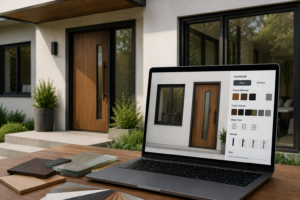

Picking new doors and windows used to mean flipping through paper catalogs and guessing how a finish might look on your actual house. That guesswork often led to costly mistakes. A homeowner would order a window in the wrong shade, or a contractor would install a door that clashed with the rest of the facade. Today, a 3d configurator removes most of that uncertainty by letting buyers see their choices rendered in real time, on a model that resembles their own space.
This shift matters because doors and windows are not small purchases. They affect insulation, security, natural light, and curb appeal for years. Getting them right the first time saves money and frustration.
What a 3D Configurator Actually Does
A 3d configurator is an interactive tool that lets a person build a product visually, piece by piece, before committing to an order. For doors and windows, that means selecting frame material, glass type, hardware, color, and dimensions, then watching the model update instantly.
Instead of imagining how oak trim might look next to a matte black handle, the buyer sees it rendered on screen. Some tools go further and let users upload a photo of their home, then place the configured door or window into that image. This turns an abstract decision into something concrete.
The building materials industry has been slower than furniture or automotive sectors to adopt this kind of tool, but that is changing fast. Manufacturers now recognize that buyers want to see before they buy, especially for items as visible and long-lasting as an entryway or a bay window.
Reducing Costly Ordering Mistakes
Custom doors and windows involve dozens of variables. Frame width, glazing pattern, opening direction, sill type, and finish all interact with each other. A slight miscalculation in any one of these can mean a product that does not fit the opening or does not match the rest of the house.
A configurator forces those variables into a guided sequence. Users cannot move to the next step until the current one is complete, which naturally prevents missing specifications. Many tools also flag incompatible combinations, such as a glazing option that is not rated for a chosen climate zone, before the order goes through.
This structured process cuts down on returns and remakes. Suppliers save on wasted materials and shipping, while buyers avoid the delays that come with a product needing to be reordered.
Helping Buyers Compare Materials Side by Side
Wood, vinyl, fiberglass, and aluminum all behave differently in cost, durability, and appearance. Reading a comparison chart rarely conveys how each material actually looks once installed. A 3d configurator lets someone toggle between materials on the same design and see the difference immediately.
This side-by-side view also helps buyers understand trade-offs. A fiberglass frame might cost more upfront but resist warping better than vinyl in humid climates. Seeing both options rendered on the same door design, rather than reading about them separately, makes that trade-off easier to weigh.
For building materials suppliers, this kind of comparison tool also reduces the number of back-and-forth questions during the sales process. Buyers arrive at a decision with more confidence because they have already seen their options rendered clearly.
Making Remote and Online Buying Practical
Many people now research and purchase home improvement products entirely online, without visiting a showroom. That shift has made visualization tools less of a luxury and more of a requirement.
A 3d configurator gives online buyers something close to the in-person showroom experience. They can rotate a model, zoom into hardware details, and check how a color reads under different lighting settings. Without this, an online buyer has little more than static photos and written descriptions to work from.
This matters even more for custom orders, where standard product photos do not exist yet. The configurator essentially creates a preview of something that has not been manufactured, giving the buyer a reasonable sense of what to expect.
Supporting Contractors and Architects During Planning
Contractors and architects often specify doors and windows on behalf of clients, which adds another layer of communication. A configurator gives these professionals a shared visual reference to discuss with homeowners, rather than relying on written specifications alone.
When a client can see a rendered option and approve it directly, there is less room for miscommunication later in the project. Some tools allow professionals to save multiple configurations and present a shortlist, which speeds up client approval and keeps a project on schedule.
This collaborative use case has pushed manufacturers to build configurators that support saved projects, shareable links, and export options for specification sheets. These features turn the tool into part of the broader planning workflow, not just a novelty for individual shoppers.
What to Look for in a Good Configurator
Not every 3d configurator delivers the same experience. A useful one should render changes without noticeable lag, offer accurate representations of texture and color, and include enough material options to reflect what is actually available for purchase.
It should also handle dimensional accuracy. A tool that looks impressive but allows unrealistic sizing or ignores structural constraints can mislead buyers rather than help them. The best configurators tie visual choices directly to manufacturing data, so what a buyer sees on screen matches what gets built.
Ease of use matters too. A configurator with too many technical terms or confusing navigation defeats its own purpose. The goal is to make a complex decision simpler, not to introduce a new layer of confusion.
Final Thoughts
Choosing custom doors and windows involves more decisions than most people expect, from material and finish to hardware and glazing. A 3d configurator brings clarity to that process by letting buyers see their choices rendered accurately before anything is manufactured.
As more of the building materials industry moves toward digital sales and remote consultations, tools like this are becoming less of an add-on and more of a baseline expectation. For buyers, contractors, and architects alike, being able to preview a product before committing to it changes the entire experience of ordering something custom.