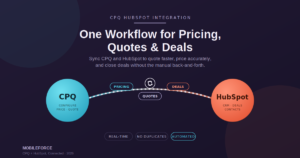

CPQ HubSpot Integration is quickly becoming the fix for a problem almost every growing sales team eventually runs into: too many disconnected tools doing too little talking to each other. If your reps are still updating prices by hand, retyping deal details into HubSpot after building a quote somewhere else, or chasing someone down for discount approval, you already know the cost. It’s not just annoying — it’s slow, and slow quoting has a way of quietly draining revenue nobody notices until the pipeline report comes up short.
Manual pricing updates, disconnected CRM and quoting systems, duplicate data entry, quote errors, sluggish approvals, customer records that don’t match across platforms — none of this is unusual, but none of it has to be permanent either. Connecting CPQ software directly to HubSpot turns five disjointed steps into one continuous workflow. Pricing, quotes, customer data, and deal stages stay in sync automatically, so reps stop reconciling numbers between systems and start trusting that what they see is actually current. Here’s a closer look at what CPQ HubSpot Integration really does, and why it’s worth the setup effort.
1. What Is CPQ HubSpot Integration?
Put simply, CPQ HubSpot Integration links a Configure-Price-Quote system to HubSpot’s CRM so the two platforms share information instead of quietly working in isolation. Product configuration, pricing logic, and quote generation happen on the CPQ side, while HubSpot keeps handling contacts, deals, and pipeline stages the way it always has.
Why does this matter so much? Because it eliminates the manual bridge reps used to build themselves — pulling a customer’s details from HubSpot, typing them into a separate quoting tool, then hoping they remembered to update the deal afterward. With the two systems connected, that back-and-forth just disappears.
2. Centralize Pricing and Product Data
Here’s a familiar scenario: pricing lives in one spreadsheet, the CRM lives somewhere else, and two reps end up quoting the same prospect two different numbers. Nobody did anything wrong — the systems just weren’t talking.
CPQ HubSpot Integration fixes this by keeping product and pricing data centralized and synced in real time. The moment a price list or product catalog changes, every quote being built reflects it instantly. Reps aren’t relying on memory or last month’s price sheet, and pricing stays consistent no matter who’s running point on the deal.
3. Generate Accurate Quotes Faster
Quoting is often the exact moment sales momentum either builds or quietly dies. A prospect asks for pricing, and if the answer takes two days instead of twenty minutes, their interest has usually moved on to something else by the time it arrives.
When CPQ software is connected to HubSpot, quote creation pulls straight from deal data that’s already sitting in the CRM — no manual re-entry required. Guided selling steers reps toward the right configuration based on what the customer actually needs, and once that’s set, the proposal generates automatically, formatted and ready to send in minutes rather than hours.
4. Sync Deals and Customer Data Automatically
Few things frustrate a sales team faster than updating a deal in one place and watching it sit stale everywhere else. CPQ HubSpot Integration keeps contact records, deal stages, and opportunity details synchronized between both systems without anyone lifting a finger.
Send a quote, and HubSpot knows. A prospect accepts it, and the deal stage updates on its own. That kind of automatic sync gives sales managers real pipeline visibility, so the whole team — reps and leadership alike — is actually looking at the same version of reality.
5. Automate Approval Workflows
Discount approvals are a classic bottleneck. A rep submits a quote that needs a manager’s sign-off, and it sits untouched in an inbox while the prospect waits for an answer that should’ve taken minutes.
CPQ HubSpot Integration solves this with approval workflows tied directly to the deal and pricing data already living in HubSpot. Cross a discount threshold, and the right approval chain kicks in automatically — giving businesses real pricing governance without making reps wait around for it. Teams that put this kind of workflow automation in place consistently see faster approvals and noticeably shorter sales cycles.
6. Improve Sales Productivity and Collaboration
When pricing, quoting, and CRM data all live inside one connected workflow, reps spend a lot less time on busywork and a lot more time actually talking to prospects. Sales automation strips out the repetitive parts — data entry, manual formatting, chasing updates — so reps can focus on what actually moves a deal forward.
It also makes cross-team collaboration easier. Sales, RevOps, and finance are all working off the same synchronized information, which cuts down on the “wait, which number is right?” conversations and keeps deals progressing instead of stalling on internal confusion.
7. Common CPQ HubSpot Integration Challenges and Solutions
Connecting CPQ to HubSpot isn’t always a flip-the-switch experience, and it’s worth knowing where teams typically hit friction before you get there yourself.
Data migration tends to get messy when legacy pricing or product records weren’t clean to begin with — audit and standardize that data before the migration, not after. CRM mapping needs careful alignment between CPQ fields and HubSpot properties, so map this out before go-live rather than discovering mismatches mid-rollout. Integration complexity varies a lot depending on the platform, and choosing CPQ software built with HubSpot compatibility in mind from day one saves a lot of custom development headaches later. User adoption often stalls simply because the interface feels clunky, so prioritize something reps will actually want to open. And workflow configuration should be stress-tested against real deal scenarios before a company-wide rollout, so pricing or approval logic issues surface early instead of during a live deal.
8. Best Practices and Future Trends
AI is starting to reshape what a connected CPQ and HubSpot workflow can actually do. Predictive pricing models can now suggest optimal quote terms based on what’s historically closed, while revenue intelligence tools surface patterns a busy sales team would likely never spot on their own.
Workflow automation is also expanding well past approvals, stretching into full quote-to-cash automation that links quoting, contracts, and billing into a single continuous process. Platforms like Mobileforce are built around exactly this kind of scalable Revenue Operations approach, pairing CPQ, HubSpot integration, and workflow automation to support broader digital sales transformation. Businesses that get these connected, AI-informed systems in place now will have a real head start as sales processes keep evolving.
Conclusion
CPQ HubSpot Integration addresses a challenge nearly every scaling sales team eventually faces: tools that don’t talk to each other, slowing down quoting and letting pricing errors and CRM mismatches creep in. By centralizing pricing, automating quote creation, syncing deals in real time, and streamlining approvals, businesses turn several disconnected steps into one workflow that actually holds together.
The payoff shows up in the numbers that matter — faster quote turnaround, fewer errors, clearer pipeline visibility, and reps who spend more time selling and less time untangling manual processes. As AI-driven CPQ and integrated Revenue Operations keep maturing, the businesses that connect their quoting and CRM systems now will be the ones with room to scale without the growing pains.
Frequently Asked Questions
What is CPQ HubSpot Integration?
CPQ HubSpot Integration connects Configure-Price-Quote software to HubSpot’s CRM, allowing pricing, quotes, and deal data to stay synchronized automatically within a single workflow.
How does HubSpot integrate with CPQ software?
It works through data syncing that links contacts, deals, and pipeline stages in HubSpot with product configuration, pricing, and quote generation happening on the CPQ side.
What are the benefits of integrating CPQ with HubSpot?
Centralized pricing, faster and more accurate quotes, automated approval workflows, real-time deal syncing, and noticeably better sales productivity across the team.
Can CPQ HubSpot Integration automate pricing and quotes?
Yes — it automates pricing rules, product configuration, and quote generation, which cuts down on manual work and the errors that come with it.
What should businesses consider before implementing CPQ HubSpot Integration?
Take stock of data quality, plan out CRM field mapping in advance, understand the integration’s complexity, prioritize user adoption, and test workflow configuration before rolling it out company-wide.