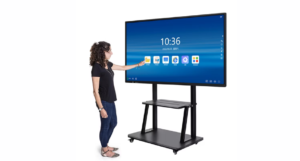

Walk into any modern classroom, boardroom, or training center today, and you’ll notice something different — the old chalkboard, marker-stained whiteboard, or dusty projector screen has quietly disappeared. In its place is a sleek, responsive display that lets people write, swipe, share, and collaborate in real time. This shift isn’t just a passing trend; it’s a fundamental change in how we teach, present, and collaborate, driven by the rise of the Interactive Flat Panel.
Logic AV has been at the forefront of this transformation, helping schools, corporates, and training institutes across India upgrade from outdated presentation tools to smart, connected display solutions that genuinely improve how people communicate and collaborate.
In this article, we’ll break down exactly why traditional whiteboards and projectors are losing ground, what makes an Interactive Flat Panel Display so much more effective, and how to choose the right solution for your classroom, office, or training space.
The Problem With Traditional Whiteboards and Projectors
Before understanding why interactive displays are taking over, it’s worth looking at why the old tools are falling short in today’s fast-paced, digital-first environment.
Whiteboards: Simple, But Limited
Traditional whiteboards have been a staple in classrooms and meeting rooms for decades. They’re easy to use, but that’s about where the advantages end. Content written on a whiteboard disappears the moment it’s erased — there’s no way to save, share, or revisit it later without manually taking a photo. Markers dry out, boards get stained over time, and there’s zero opportunity for multimedia integration. In a world where information needs to be recorded, shared instantly, and revisited later, a whiteboard simply can’t keep up.
Projectors: Outdated Technology With Ongoing Costs
Projectors were once the go-to solution for presentations, but they come with a long list of drawbacks. Bulbs burn out and need frequent, costly replacement. Image quality is highly dependent on room lighting — a bright room can wash out the projected image entirely. Projectors also require a significant amount of space, careful calibration, and a separate screen or wall. On top of that, most projectors offer no interactivity at all; they simply display static content with no way for users to engage directly with what’s on screen.
The Growing Demand for Digital Collaboration
As hybrid work and blended learning become the norm, businesses and educational institutions need tools that support real-time collaboration, video conferencing, cloud connectivity, and multimedia content — none of which whiteboards or projectors were ever designed to handle.
What Is an Interactive Flat Panel Display?
An Interactive Flat Panel Display is essentially the next generation of both the whiteboard and the projector, combined into a single, powerful device. It’s a large touchscreen display — often ranging from 55 to 100+ inches — that allows users to write, draw, annotate, and interact directly on the screen using a finger, stylus, or pen, much like using a giant tablet.
Core Features That Set It Apart
Unlike a whiteboard or projector, an interactive display integrates a full computing environment. Users can browse the internet, run presentation software, join video calls, annotate PDFs, and save their work instantly to the cloud or a USB drive. Multiple users can often write on the screen simultaneously, making group brainstorming sessions far more dynamic and productive.
Built for Both Education and Business
Whether it’s a teacher explaining a complex diagram, a manager presenting quarterly results, or a team brainstorming a new product idea, the flexibility of an interactive display makes it suitable for virtually any environment where communication and visual engagement matter.
Why Businesses and Schools Are Switching to Interactive Smart Boards
The shift toward Interactive Smart Board technology isn’t just about having the latest gadget — it’s about solving real, everyday frustrations that come with traditional tools.
Real-Time Collaboration Made Simple
With an interactive smart board, multiple participants can contribute to a session at the same time — writing, editing, and moving content around the screen without waiting their turn. This is a massive upgrade from a single marker being passed around a whiteboard.
Content That’s Never Lost
Every note, diagram, or annotation made on an interactive board can be saved instantly and shared via email, cloud storage, or a simple QR code. This means no more scrambling to write down notes before they’re erased — everything is preserved automatically.
Seamless Integration With Digital Tools
Interactive smart boards typically run on Android or Windows operating systems, allowing users to open documents, browse the web, use presentation software, and connect to video conferencing platforms — all from a single screen, without needing a separate computer or projector setup.
A More Engaging Experience for Everyone
Whether it’s students in a classroom or employees in a training session, people simply pay more attention to interactive, dynamic content than static text on a whiteboard or a dimly projected slide. This increased engagement translates directly into better retention and more productive sessions.
Interactive Digital Board: Transforming Modern Classrooms
Nowhere is the shift more visible than in education, where the Interactive Digital Board has become a cornerstone of modern teaching methods.
Making Lessons More Engaging
Teachers can incorporate videos, animations, interactive quizzes, and multimedia content directly into their lessons, capturing student attention far more effectively than a static chalkboard ever could. Complex concepts — whether in science, math, or geography — become much easier to understand when illustrated through interactive diagrams and simulations.
Supporting Different Learning Styles
Every student learns differently. Some grasp concepts better through visual aids, others through hands-on interaction. An interactive digital board supports multiple learning styles simultaneously, allowing teachers to switch between text, video, images, and interactive exercises within a single lesson.
Reducing Preparation Time for Educators
Teachers can save lesson plans, reuse annotated slides from previous classes, and access a library of digital teaching resources instantly. This significantly cuts down the time spent recreating diagrams or notes from scratch for every class.
Bridging Remote and In-Person Learning
With built-in video conferencing capabilities, an interactive digital board makes it easy to include remote students in live classroom sessions, ensuring no one misses out regardless of their location.
The Power of Interactive Touch Screen Technology
At the heart of every interactive display is its Interactive Touch Screen technology, and understanding how this works helps clarify why these devices perform so much better than older tools.
Precision and Responsiveness
Modern interactive touch screens use advanced infrared or capacitive touch technology that accurately detects multiple touch points simultaneously. This means several people can write or interact with the screen at once without lag or interference — something impossible with a traditional whiteboard and marker.
Palm Rejection and Natural Writing Experience
High-quality interactive touch screens include palm rejection technology, allowing users to rest their hand on the screen while writing, just like they would on paper — without accidentally triggering unwanted marks or commands.
Durability Built for Daily Use
Unlike projector screens or standard whiteboards that wear out over time, interactive touch screens are built with scratch-resistant, anti-glare glass designed to withstand years of daily use in high-traffic classrooms and offices.
Understanding Ops for Interactive Panel: The Technology Behind the Screen
When evaluating interactive displays, it’s important to understand the Ops for Interactive Panel — the OPS (Open Pluggable Specification) module that essentially acts as the computer powering the display.
What Is an OPS Module?
An OPS module is a slot-in PC unit that fits directly into the back of an interactive flat panel, giving it full computing capability without needing an external desktop or laptop connected via cables. This means the display functions as a standalone smart device right out of the box.
Why It Matters
Because the OPS module is removable and upgradeable, businesses and institutions can update the internal computing hardware as technology advances, without needing to replace the entire display. This significantly extends the lifespan of the investment and keeps performance up to date for years to come.
Simplified Setup and Maintenance
With an OPS-powered interactive panel, there’s no tangle of cables connecting a separate computer, projector, and screen. Everything is integrated into a single unit, making installation, troubleshooting, and day-to-day use significantly simpler for IT teams and end users alike.
Choosing the Right Interactive Flat Panel India Businesses and Schools Trust
With so many options available, selecting the right Interactive Flat Panel India institutions rely on requires careful consideration of a few key factors.
Screen Size and Resolution
The right screen size depends on the size of the room and the typical viewing distance. A smaller meeting room might only need a 55 or 65-inch panel, while a large lecture hall or auditorium may require a 86-inch or larger display for optimal visibility. 4K resolution ensures sharp, clear visuals regardless of screen size.
Touch Technology and Responsiveness
Look for panels offering high touch-point accuracy and true palm rejection, ensuring a smooth, natural writing and interaction experience for multiple users at once.
Software Compatibility
A good interactive panel should support widely used software and platforms — from Microsoft Office and Google Workspace to popular video conferencing tools — ensuring it integrates seamlessly into existing workflows.
After-Sales Support and Warranty
Given that these are long-term investments, it’s important to choose a provider that offers reliable installation support, training, and after-sales service. This is where working with an established supplier like Logic AV makes a meaningful difference — ensuring businesses and schools aren’t left troubleshooting alone after purchase.
Budget and Scalability
While upfront costs may be higher than a whiteboard or projector, the long-term value — reduced maintenance, better engagement, and multi-functional capability — often makes interactive panels a smarter long-term investment.
How Logic AV Supports Businesses and Institutions
Logic AV works closely with schools, corporate offices, and training centers across India to identify the right interactive display solutions for their specific needs. Rather than pushing a generic product, the focus is on understanding the space, the use case, and the budget before recommending the right panel size, touch technology, and computing configuration.
From initial consultation through installation, training, and ongoing support, Logic AV aims to make the transition from traditional whiteboards and projectors to modern interactive technology as smooth and hassle-free as possible — ensuring businesses and institutions get maximum value from their investment.
The Long-Term Benefits of Making the Switch
Transitioning to interactive displays isn’t just about convenience — it delivers measurable, long-term value.
Lower Total Cost of Ownership
While the initial investment in an interactive panel may be higher than a whiteboard or basic projector, the elimination of recurring costs — replacement bulbs, markers, cleaning supplies, and separate computing equipment — often results in significant savings over the device’s lifespan.
Improved Productivity and Engagement
Meetings run more efficiently when content can be saved, shared, and revisited instantly. Classrooms become more engaging when lessons incorporate multimedia and interactive elements. Both translate into better outcomes, whether measured in student performance or business productivity.
Future-Proof Technology
With upgradeable OPS modules and regular software updates, interactive flat panels are built to adapt to evolving technology needs, protecting the investment for years to come rather than becoming obsolete within a short period.
The shift away from traditional whiteboards and projectors isn’t just about upgrading technology for the sake of it — it’s about equipping classrooms, offices, and training centers with tools that genuinely improve communication, collaboration, and engagement. An Interactive Flat Panel Display brings together writing, multimedia, video conferencing, and cloud connectivity into a single, intuitive device, eliminating the frustrations that came with markers, projector bulbs, and disappearing notes.
Whether you’re outfitting a classroom with an Interactive Digital Board, upgrading a boardroom with an Interactive Touch Screen, or exploring the latest Interactive Flat Panel India businesses are adopting, working with an experienced provider like Logic AV ensures you choose the right solution for your space and budget — backed by reliable installation and ongoing support.
As classrooms and workplaces continue to embrace digital-first collaboration, it’s clear that the humble whiteboard and the aging projector have reached the end of their era. The future belongs to smarter, more connected, and far more engaging Interactive Smart Board technology.
Frequently Asked Questions
What is the difference between an interactive flat panel and a smart TV?
While both may look similar, an interactive flat panel is designed specifically for touch interaction, writing, and annotation, with built-in software for education and business collaboration. A smart TV, on the other hand, is primarily designed for media consumption and lacks the precise touch and writing capabilities needed for classrooms or meeting rooms.
How much does an interactive flat panel display cost in India?
Pricing depends on factors like screen size, resolution, touch technology, and included computing hardware (such as an OPS module). Smaller panels for compact meeting rooms are generally more affordable, while larger panels for lecture halls or boardrooms cost more. It’s best to get a customized quote based on your specific room size and requirements.
Can interactive whiteboards be used without internet access?
Yes, most interactive panels can be used offline for basic writing, annotation, and presentation purposes. However, features like cloud saving, video conferencing, and online content access require an internet connection.
Is an interactive flat panel suitable for small businesses, or only large corporations?
Interactive flat panels are suitable for businesses of all sizes. Smaller companies often use compact panels for meeting rooms and client presentations, while larger corporations may deploy multiple panels across training centers, boardrooms, and collaborative workspaces.
How long do interactive flat panel displays last?
With proper care, high-quality interactive panels typically last several years, often outlasting the usable life of projectors due to their durable, scratch-resistant screens and lack of consumable parts like projector bulbs. Upgradeable OPS modules also help extend their usable lifespan.