
Introduction to 2D Animation Software
2D animation software empowers creators to produce engaging visuals for videos, games, and films using digital tools for frame-by-frame or vector-based animation. These programs range from beginner-friendly options with drag-and-drop interfaces to professional suites supporting complex rigging and export formats. In this review category article on smartseoarticle.com, top tools like Toon Boom Harmony, Adobe Animate, and Moho stand out for their features, usability, and value in 2025.
Best Professional 2D Animation Software
Toon Boom Harmony leads as an industry-standard tool used in TV shows, films, and games, offering dynamic camera movements, advanced rigging, and vector drawing for scalable results. It supports both traditional frame-by-frame and cut-out animation, with a color palette system for consistency and a 21-day free trial ideal for testing workflows. Professionals praise its depth for studio production, though it requires a learning curve for newcomers.
Adobe Animate, part of the Adobe suite, excels in frame-by-frame and tween-based animation for web content and interactive media, compatible with Windows and macOS. Key strengths include customizable brushes, easing tools, and seamless integration with other Adobe apps like Photoshop for enhanced editing. At around $20.99 monthly, it suits intermediate users but demands subscription commitment.
Moho Pro (formerly Anime Studio) balances power and affordability with a one-time purchase of $399.99, featuring smart bones rigging and vector tools for puppet animation. It’s favored by studios like Cartoon Saloon for films such as Wolfwalkers, offering high usability without ongoing fees and a 30-day trial. Users highlight its efficiency for both beginners and experts in cut-out styles.
Free and Open-Source 2D Animation Options
Pencil2D provides core frame-by-frame tools without bloat, making it lightweight for hand-drawn animations on modest hardware. It’s completely free and open-source, focusing on essentials like onion skinning for precise timing, ideal for hobbyists entering 2D workflows.
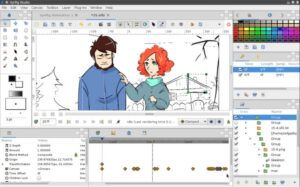
OpenToonz, another free powerhouse, supports professional frame-by-frame work and was used in Studio Ghibli productions, with effects like scanning and compositing built-in. Blender’s Grease Pencil tool adds 2D capabilities to its free 3D ecosystem, enabling hybrid animations with rigging and rendering. Synfig Studio offers vector tweening for smooth motions at no cost, though its interface feels dated compared to paid rivals.
Beginner-Friendly Cloud-Based Tools
Animaker tops lists for ease with drag-and-drop templates, pre-built characters, and cloud access, earning high G2 ratings for quick video creation. Vyond and Powtoon follow suit, blending animation with presentations via voice-overs and PowerPoint integration, perfect for marketers or YouTubers. These start free but scale to paid plans for advanced exports, prioritizing speed over deep customization.
Comparison of Top 2D Animation Software
| Software | Key Strength | Pricing Model | Best For | Rating (Out of 5) |
|---|---|---|---|---|
| Toon Boom Harmony | Rigging & studio tools | Subscription/trial | Pros & TV/film | ★★★★★ |
| Adobe Animate | Tweening & integration | $20.99/mo | Web & interactive | ★★★★ |
| Moho Pro | Bones rigging, one-time buy | $399.99 once | Cut-out & films | ★★★★★ |
| Pencil2D | Lightweight frame-by-frame | Free | Beginners/hand-drawn | ★★★★ |
| Animaker | Templates & cloud | Freemium | Quick videos | ★★★★★ (G2) |
Factors to Consider When Choosing
Evaluate your needs: frame-by-frame suits artistic styles like Krita or TVPaint, while rigging speeds character work in Moho or Harmony. Hardware matters—desktop apps like Adobe demand more power than cloud options like Powtoon. Trial versions help; most offer 21-30 days to assess compatibility with creative pipelines.
For graphic designers and animators, integration with tools like Premiere Pro enhances post-production. Budget-wise, free tools like Blender cover basics, but pros invest in Harmony for export quality. Community feedback on Reddit emphasizes TVPaint or Clip Studio for pure drawing.
Future Trends in 2D Animation Software
AI features like auto-lip sync in Adobe Character Animator and auto-animate in Linearity Curve signal efficiency gains for 2025. Hybrid 2d animation software in Blender grows for versatile creators. Expect more cloud collaboration as remote teams expand.
More info to visit smartseoarticle